Storage Solutions for Computer Data
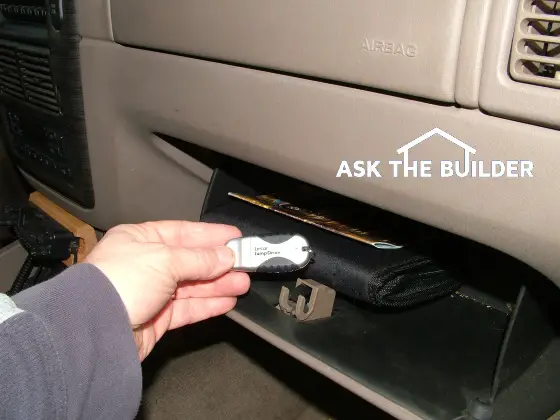
Look at that small flash drive in my fingers! It holds 1 gigabyte of information. But as technology advances, it will be obsolete in just 18 months. Putting it in my car's glove box gets it away from my house in the event of a fire. PHOTO CREDIT: Tim Carter
DEAR TIM: I have a feeling that I might be a lot like many of your readers. I have a personal computer at home and wonder what is the best way to protect it and other data I have from fires and flooding. Some of my digital photos and other data are irreplaceable. Can I build something that would be fireproof and floodproof? On a personal level, how do you protect your computer data? Chuck E. Farmington Hills, MI
DEAR CHUCK: Your question presents, I believe, one of those rare instances where many people know they have a problem, but are too lazy to do something about it, or they make excuses as to why it never gets done. But if a fire or flood strikes, then Armageddon strikes in that person's private world and they are consumed by guilt and heartache.
For example, just days ago on my own local news a woman's flooding plight was shown. Priceless family photos were immersed in basement flood waters. Had the woman just taken the time to place them 6 feet in the air instead of in a box on the floor, her photos would not be waterlogged and wrinkled.
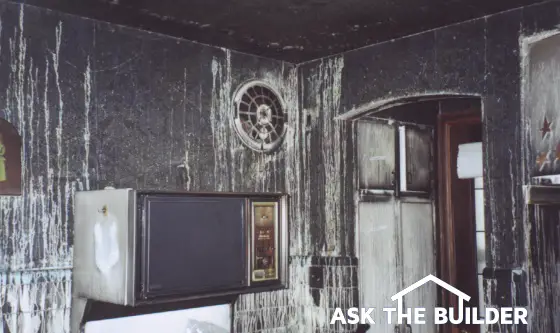
How hot does a house fire get?
As far as fires go, they can cause damage just as fast as a flash flood. If a couch, or other combustible objects, catch fire in the room where you store your computer and other data, the temperature in the room just 3 feet off the floor can reach 500 F within three minutes of the ignition of the fire. Less than a minute later, the temperature in the room can climb to 1,400 F. Most plastic CD-ROM discs, magnetic disks and even circuit boards would be ruined within seconds when exposed to these extreme temperatures.
How about a fireproof safe?
You can buy many different fireproof safes and storage cabinets that can do a fantastic job of protecting the contents so long as they are placed inside the safe. Some may perform well in a flood if they have waterproof seals around the doors. But one of the problems is making sure the stuff you want to store fits inside the safe or the cabinet.
You can build a crude masonry storage bunker that will help protect your possessions in all but the worst fires. This structure would function much like a classic firewall in a building. Talk to any firefighter and they will tell you that solid masonry walls can take all but what the most severe fires can dish out. But the problem is dealing with an effective door to the bunker that will stop the searing gases from the fire from seeping into the masonry hut.
Store data outside the house
I solved my personal problem with the help from some computer savvy friends, two quick inexpensive purchases from the Internet and a few spare parts I had sitting around my house.
The first thing I purchased was an incredibly small flash or jump drive that acts just like the hard drive on your computer. I was able to purchase one that has an enormous 1 gigabyte storage capacity. This device is the size of my thumb, but much flatter. It plugs right into one of those small rectangular USB ports in my computer.
Once inserted, my computer thinks it is just another hard drive. I copy important folders and data onto this device, disconnect it and take it up and throw it in my car's glove box. Since I park my car on my driveway, it is safe from any house fire that might involve my attached garage. Floods normally don't cut across my driveway.
External Hard Drives
From time to time, I have discovered that I need more space than the little flash drive has to offer. It just so happens I had several older computers around I no longer use. These idle computers contained stagnant internal hard drives that still had enormous amounts of unused storage space. It only took me two minutes to remove the hard drive from one of the old computers. Fifteen dollars got me a connection cable that powers the drive and connects the old drive to my computer. I can transfer huge amounts of backup data to the old drives and store this device in a plastic bag in my car's trunk.
Offsite storage of data is critical. Some people say to store data in safe deposit boxes or other places. But that is hard to do and is a reason why most don't do it. Walking out to your car takes seconds. But if you park your car in an attached garage, then you need to develop a means to safely store your data outside of your home.
Inexpensive plastic 5-gallon buckets with snap-on lids work well as they are waterproof. But they can become saunas if you place them in direct sunlight. The small flash drives can be placed in a zip-lock plastic freezer storage bag and stored in an outdoor shed or under an artificial rock in a garden. The most important thing to remember is to protect these emergency backup storage devices from the same heat and moisture that you think might affect them inside your home.
If you ever bring one of these devices indoors and they are cold, you must allow them to reach room temperature and then wait an additional four hours before you use them. Condensation can form on the internal sensitive electrical parts of the hard or flash drives. If you apply power to them while the condensation is still present, they can short out and fail to function.
Column 552

Tim built custom homes and did ultra-custom remodeling for 20+ years before launching his Ask the Builder media presence. He was selected as one of the Big 50 by Remodeling magazine in 1993. This award gave birth to Ask the Builder in October 1993. Tim also operates https://DrawPlumbingPlans.com. His @askthebuilder YouTube channel was the first home improvement channel on YouTube.